
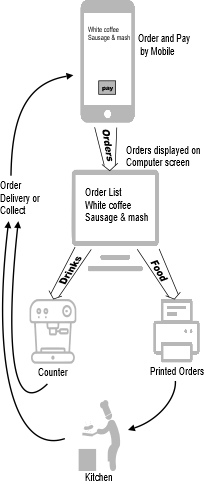

SuperOrder App allows your customers to order food and drink using their phones
Easy to Try
Download the SuperOrder App on to your phone.
We have a special demo site (running 24/7), simply select the SuperOrder Demo Centre (top of the list) and start ordering.
Installing
Download and install SuperServer on to a Windows computer. Phone us if you need help.

SuperServer will start in a special demonstration mode with a preloaded menu, handling orders automatically.
Order from your Business
Using a phone, leave the SuperOrder Demo Centre and select your Business. Try placing a few orders and watch them appear on the computer screen.
Try handling the orders as you would in your Business
Simply switch off Demo mode (you are still in test mode, so no real money is taken), then click on the screen as each stage of a Customer’s order progresses.
Running SuperOrder
That’s great, but now I want to make SuperOrder work for me
You will need to enter your own menu and take payments from customers, but how? Don’t worry if you have problems, simply phone for help. Also, we have a Remote Tutor feature which allows us to show you how to use and get the best from SuperOrder.



Suitable for All
SuperOrder is suitable for all establishments and supports both card and cash payments. It puts you in ‘complete control’ of the order and payment process, so you can handle ‘your customers your way’. As you can choose your own Card Payment Provider, SuperOrder can be up and running in minutes.